Improvements
OSCAR-4469 - Introduce Default Tickler site preference selection for multisite
- This improvement introduces a "Default Tickler Recipient' drop selection to define a preferred Default Location. Previously, while a user could associate a default Recipient for every Location in OSCAR, there were certain sections in the system where the Location was not known and hence the default would not function as intended.
Introducing a Default Tickler Location allows users to select their preferred Location in cases where the Location is not defined.
The new dropdown is found under Preferences and displays only for systems with Multisite enabled: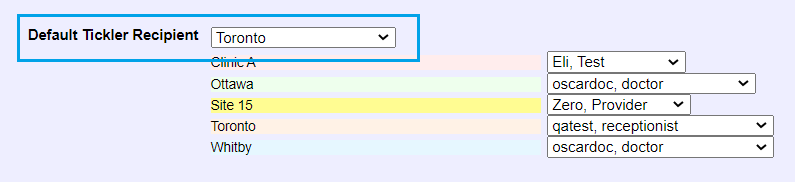
OSCAR-4461 - Increase Name field length in appointment to facilitate long patient names
- Clinics that tend to have patients with longer names can now enable a setting that increases the length of visible characters in Last Name field when editing/creating appointment.
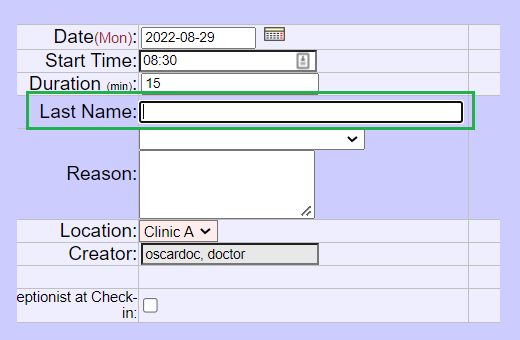
Administration > Schedule Management > Display Settings > Increase 'Last Name' field width during create/edit appointment
OSCARPRO-1684 - Ability to configure date for drug to drug interactions display
- Previously the RX Interactions within OSCAR only count certain 'active' medications within OSCAR. Depending on the way data is being inputted into the Rx Module, especially in relation to migrations from another EMR, certain old drugs may not count as 'active' and thus not display as part of the drug to drug interactions.
This release introduces a setting to allow clinics to set a 'number of days in the past' for which drug to drug interactions should be counted, regardless of whether the drug is 'active' or not.
To enable this, an Administrative user can select "Yes" and input the desired number of days for which the interactions should apply for (eg. 365 days)
Administration > System Management > Rx Settings > Display Drug to Drug interaction results for the following number of days in the past:
OSCARPRO-1565 - Open Health Custom Forms Unavailable In OSCAR Pro
- This release introduces 4 new Forms available for use. These Forms were previously created on a custom basis within a different OSCAR EMR build and are being made available for systems that switch to OSCAR Pro.
Form names:
- Epistaxis Evaluation
- Otologic Evaluation
- Sinus Evaluation
- Sinus Follow Up
The Forms can be enabled under Administration > Select Forms/eForms > Select Forms.
See the following guide for more information: How To Enable/Disable Forms
New Features
OSCAR-4148 - Add Preference to prevent autoclose of echart on sign
- A new Preference has been added to allow users to choose whether clicking the "Sign & Save" button on the eChart will auto-close the eChart automatically.
The setting can be found under the following Preference:
Preferences > Configure Sign & Save Button in eChart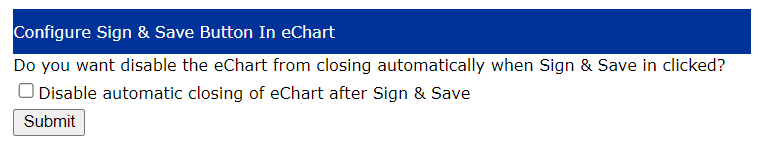
When this preference is checkmarked, clicking Sign & Save will Sign and Save the note, and refresh the eChart (without automatically closing it).
OSCAR-1168 - Lab measurements to map using LOINC coding (loinc_code)
- Historical measurements that display when clicking a specific test name on a patients hl7 lab file traditionally groups the historical measurements based on the Lab Identifier value sent by the originating lab (Lifelabs, Dynacare, etc.).
As Lab Identifiers differ between lab services, this created an inconsistency in the display of historical measurements when viewed by clicking a lab result directly (eg. Lifelabs may not have the same identifier as Dynacare or vice versa, or an identifier can change from time to time).
This release introduces another way for lab measurements to be organized outside of "Lab Identifier" when viewing historical measurement results for a specific measurement. It can be be modified via the following setting:
Administration > Labs/Inbox > Lab Display Settings > Display historical HL7 lab value results based on:
Bugs
OSCAR-4443 - eOrder CC is sending incorrect path in payload
- Resolves an issue with an eOrder sending an incorrect value when a CC is included during submission
OSCAR-4439 - Paid total incorrect in invoice report when using Payment Date search
- Resolves issue associated with the PAID and ADJ columns displaying incorrect information when using a specific workflow within the Invoice Report in ON build.
OSCAR-4421 - eChart notes on load occasionally throws js error, preventing setupNotes function from running and note save button working
- Fixes a rare issue associated with slow connections that causes the encounter note section not to fully load on eChart refresh.
OSCAR-4147 - Staff Listed on Schedule Group Dropdown
- Previously the 'Has Schedule' checkmark in provider record was not properly filtering out providers in the schedule dropdown. This is now resolved.
OSCARPRO-1709 - Error 500 when clicking Invoice # after Pro created invoice is edited
- Resolves an issue associated with a specific workflow when creating an invoice in Pro. Editing invoice after creation multiple times no longer causes an error when clicking the old OSCAR Invoice No. interface.
OSCARPRO-1671 - Unable to search specialist names using comma as separator in inbox
- Previously, the Fax Specialist field did not follow the standard search option in OSCAR to search by a combination of last name and/or first name separated by a comma. This has been resolved.
OSCARPRO-1620 - Pro Inbox upload time appears as the date
- Previously the Upload Time in the Pro Inbox was not displaying correctly. This has been resolved to display correct time.
OSCARPRO-1604 - Document note not correctly using type
- Previously when eChart was accessed via the Document pane in Pro, the Document Type assigned to the document did not transfer over to the encounter note. This has been resolved.
OSCARPRO-1336 - Create Invoice Missing Top Selections when using Sign and Bill
- Resolves issue with the top section in create invoice within Pro UI not displaying when a specific workflow is used.
Security
This release introduces numerous security improvements and fixes based on ongoing penetration testing and security assessments conducted by 3rd party agencies.
In order to prevent the spread and exposure of potential vulnerabilities, the titles and descriptions have been omitted for security reasons.