OSCAR-4361 - Sort Batch Billing By Demographic and Last Bill Date
Previously the Administration > Batch Billing results would automatically sort the results by demographic last name in ascending order.
This update introduces the ability for users to click on various headings in order to sort them as desired to make batch billing organization easier (Demographic, Service, Diagnostic, Last Bill Date)
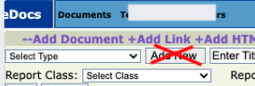
OSCAR-4349 - limit ability to add new doc type via Setting
This improvement introduces a setting that allows clinics to prevent the "Add New" button from displaying when uploading documents in the eChart or eDoc.
This is useful for clinics that want to restrict all users from creating new Document Type categories (usually for systems with a very large number of users) and manage Types via Administration access only.
Location of setting:
Administration > System Management > Document Settings > Display 'Add New' doc types in eChart and eDoc
OSCARPRO-1602 - Add ability to use 'Dispense Internally' in Pro UI
OSCAR maintains an ability to enter drug inventory and dispense against it via the Classic Rx module. This improvement introduces this features within the Pro Rx UI
New Feature
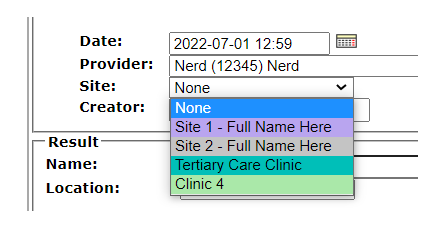
OSCAR-4413 - Add Location to Preventions
System that have Multisite enabled can now assign a desired location to a prevention.
OSCAR-4269 - Show Roster Status at top of eChart
Introduces a setting to display the Roster (Enrollment) Status of patient at the top of the eChart such "RO" or "NR"
Location of Setting:
Administration > eChart > eChart Settings > Display Roster Status
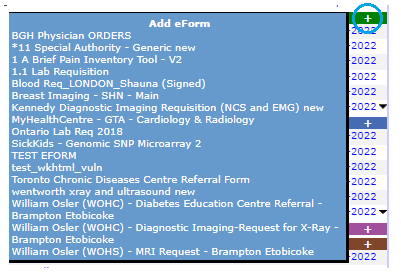
OSCAR-4009 - Add eForm Quick Pick List in eChart
Hovering over the + in the eForm heading within the eChart will now display a list of favourite eForms for selection (without opening a separate window).
eForm Favourites are set under Preferences > Set Favourite eForm Group
Clicking the + will open a new window displaying all eForms in the system.
OSCARPRO-1556 - Add gender and pronoun models to OSCAR PRO
The gender and pronoun fields in the Master Record are now included in the Pro UI code for future use.
OSCARPRO-1536 - Add watermark to Pro UI prescription
Clinics are now able to enable a watermark to display on the background of the prescription output when using the Pro Rx. This setting allows to select the display of "Clinic Name" or "Provider Name".
Location of Setting:
Administration > System Management > Rx Settings > Display Watermark on Rx Printout:
Bug
OSCARPRO-1680 - DemographicExt fail to merge when saving via postman
Addresses issue with combining demographics via API (backend)
OSCARPRO-1601 - Rx 'Additional Notes' are not pasted into eChart in Pro UI
Fixes inability of the 'Additional Notes' to display in the pasted encounter note when using Pro Rx.
OSCARPRO-1598 - Cannot rerx drug with invalid instruction values
Fixes issue associated with parsing instructions in Pro Rx when certain values are written into instructions.
OSCARPRO-1584 - Edit pharmacy object role not respected in Pro Rx
Ensures that the Edit Pharmacy object role is respected in Pro Rx. This object role configures whether a specific user or role can Edit pharmacies in the system
OSCARPRO-1583 - Display document in PDF Preference not respected in Pro using eChart
Ensures that the "Set Display Document as PDF or Image" Preference is respected when using the Pro UI to view documents from eChart.
OSCARPRO-1580 - Nested query in RxController.getPrescriptionsForDemographic is slow on systems with a large amount of prescriptions
Improves the speed associated with loading drugs under the Manage Prescriptions section that was affecting systems with large amount of content per prescription in their database.
OSCARPRO-1578 - Remit "Print PDF" pulls the incorrect information
Fixes the display of the Remit To content on 3rd party invoice print after editing Remit To field.
OSCARPRO-1526 - Unable to submit invoice when Dx is 4 digits in pro UI
Resolves inability to submit a Dx code that is more 3 digits in Pro UI.
OSCARPRO-1518 - Numbers as words not parsing quantity correctly for OSCARPRO Rx when represcribing
Fixes issue associated with parsing instructions in Pro Rx when certain values are written into instructions.
OSCARPRO-1439 - Lab Queue Displays in Pro despite being disabled
Resolves issue with Lab Queue displaying in the main menu despite it being inactive in Pro.
OSCARPRO-696 - Validation indicating 'Written Date Cannot Be Before Rx Valid Date'
Ensures that Valid Date cannot be before the Written Date when creating a prescription in Pro.
OSCAR-4497 - Reason code containing "<>" with text in between does not display in appointment history
Fixes inability of reason code displaying in appointment when "<>" are set within the reason value.
OSCAR-4444 - Using Tab in Smart Encounter results in HTML appearing in PDF output
Resolves the issue whereby using Tab on keyword within the Smart Encounter would provide HTML space tags when exported to PDF (eg. )
OSCAR-4433 - Failure to add service code and description during invoice edit
Resolves issues around selecting/adding/viewing a Service Code during invoice edit.
OSCAR-4418 - Empty tags appear on invoice PDF when clinic/agency is empty
Ensures that if Clinic/Agency address Administration setting is empty, associated commas to divide city and province do not appear on invoice PDF print
OSCAR-4404 - RMB claims double In count after generating file
Resolves an issue associated with the Claim/Record displaying an incorrect count within the Summary page of Billing Reconciliation.
OSCAR-4402 - eChart search box unable to show the matched template when typing in the template full name
Fixes issue associated with searching for and selecting an Encounter Template within the eChart. Typing in the full name of the template will now make it available for selection.
OSCAR-4394 - Consultation print displays some characters as HTML entities
Apostrophe character in Patient Address no longer display "''" in the consultation PDF output. The apostrophe character is now properly parsed.
OSCAR-4388 - Ticklers Assigned To - User Names Do Not Display In Alphabetical Order When Multi Site Is Enabled
When viewing a list of Tickler recipients for systems with Multisite enabled, the list of providers is now properly displayed in alphabetical order throughout OSCAR.