OSCAR-4525 - Add Fax column when searching for Referral in Master Record
When searching for Referral or Family doctors, users are now able to see a new column containing the Fax number of the associated specialist.
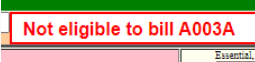
OSCAR-4483 - Set billing rule alert A003A to display if there are 2 invoices (instead of 4)
Previously, the "Not eligible to bill A003A" would display on the create invoice page if the patient had code A003A billed 4 times in the last year. This alert has been modified to reflect changes from the MOH in relation to the limit.
The alert now displays after the code has been billed 2 times for a specific patient.
OSCARPRO-1677 - Modify Smart Encounter print to respect 'open in PDF' Chrome setting
Previously when exporting the Smart Encounter Form to PDF, a file automatically downloaded to the local computer. The PDF output now respects Chrome Browser setting in relation to PDF and can now be displayed directly in the browser (instead of downloading to the local computer).
OSCARPRO-1660 - Allow ability to edit an Rx under print prescription
The OSCAR Pro Rx UI now allows users to edit medications after the prescription has been generated via the 'Save and Print' function.
The Edit Rx is located at the top right of the Print Prescription screen:
When clicked, the user will be returned to the Rx Module where they can edit, add or remove desired medications and re-save the prescription.
OSCARPRO-1506 - Improve pharmacy loading experience under Manage Pharmacies
Certain systems with a very large number pharmacies experienced mild lagging issues when searching or going through the Preferred Pharmacies list in the Pro RX UI.
The loading experience of both the search and scrolling under Manage Pharmacies has been improved by introducing pagination.
This improvement eliminates lag associated with searching and displaying Preferred Pharmacy results.
Anytime there are more then 60 results in the list, users will have the ability to click the backward or forward icons to navigate to a desired page in the results.
In addition, the PrescribeIT pharmacy search window width has been expanded to accommodate better visibility when searching pharmacies.
OSCAR-4533 - Add validation and checks to add/edit specialist to accommodate specific system
Clinics can now enable additional validation and required fields in the add/edit specialist section. The setting can be found here:
Administration > System Management > Edit General Settings > Enable Additional Validation when creating or editing a Specialist entry
When this setting is turned on, the following changes apply:
First and last name cannot be digits
First and last name are required fields
Fax and phone must follow the following format: xxx-xxx-xxxx
Fax and phone are required fields
website and email fields must be properly formatted
ON referral number is required
Province field is introduced
OSCAR-4530 - Change how Measurements load in Consultations in Eyeform3
By default, when measurements are pulled via Consultation in Eyeform3, only measurements associated with the specific appointment will populate.
Clinics now have the ability to allow for all measurements to be pulled by disabling the following setting.
(Note: this function only applies to systems that use the specialized Eyeform3 eChart)
Administration → System Management → Consultation Settings → General Consultation Request Settings → Filter Ocular Examination measurements by appointment
New Features
OSCAR-4527 - Ability to "Move" appointment keeping all original data
A new feature has been introduced to allow users to "Move" an appointment. Unlike using the "Copy" button which copies the appointment related details, allowing users to "Paste" the details to a new appointment, the "Move" button moves the entire content of the appointment to another slot.
This helps ensure that details such as Creator and Create Date are retained when the appointment is moved to another slot.
The move button is available on the Edit Appointment screen:
OSCAR-1063 - Have only physicians appear in the MRP drop down (Master Record)
Clinics have now the ability to define which providers displays in the MRP drop down within the Master Record. Traditionally, all providers assigned the 'doctor' would display.
When the associated setting is turned on under Administration, only those providers with a CPSID in the provider record will display in the MRP dropdown within the Master Record.
The setting is found in the following location:
Administration > System Management > Edit General Settings > Display only providers with CPSID under MRP in Master Record
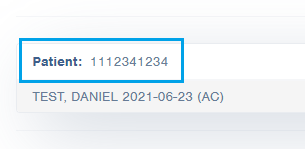
OSCARPRO-1280 - Ability to Attach Documents to Patient By Searching Health Card Number
Clinics can now use the the HIN number to locate demographics in the Patient field when attaching documents in Pro Inbox.
Bugs
OSCAR-4628 - Update button unresponsive when enrollment status is edited to Terminated or Fee For Service on master record
Resolves a bug where the Enrollment Status failed to update when the Terminated selection is made during demographic creation.
OSCAR-4619 - External ID Field in Master Record Does Not Save Upon Creating Demographic Record
Resolve issue where the 'External ID' field failed to update during demographic creator.
OSCAR-4608 - eOrder Submission fails in June due to saveDemographicExt error
Fixes pre-release bug whereby submitting an eOrder for specific patients resulted in error.
OSCAR-4592 - API Point Returns Incorrect Patient Set
Optimizes the query associated with the following API endpoint:
The query no longer returns results not associated with the specific patient.
OSCAR-4541 - Output columns are misaligned when using Generate CSV in RA when name is present
Fixes an alignment issue with the ON Billing Reconciliation .csv export. Columns are no longer misaligned when name is included.
OSCAR-4529 - Inactive providers appearing in Day Sheet report dropdown on multisite
Resolves an issue where providers who are Inactive displayed in the Day sheet section under Reports. Affecting only systems with Multisite enabled.
OSCAR-4526 - Stale Date preference not respected in encounter notes
Fixes an issue associated with the "Set Stale Date" setting found under Preferences. Using this setting will now properly filter the notes based on the users desired selection.
OSCAR-4524 - Unable to remove Referral/Family info from Master Record
Resolves an issue associated with Referral or Family doctor being completely removed from the Master Record.
OSCAR-4523 - 'complete' Excelleris lab status shows as 'Partial' in Inbox
Initial Excelleris integration in OSCAR for ON builds failed to properly account for lab status in relation to "Partial" or "Final" display in Inbox. This ticket gives OSCAR the ability to account for Excelleris statuses and translate them accordingly in the Inbox.
OSCAR-4517 - Prevention fails to display creator if provider number starts with 0
Fixes an issue whereby the Creator name failed to display in the Prevention record if their provider number in OSCAR starts with 0.
OSCAR-4509 - HIN is saved in master record despite duplicate message error
Resolves a bug whereby an HIN number was saved within OSCAR despite error message appearing when editing/creating a demographic.
OSCAR-4480 - Invoice Report export displays invoice amount instead of service amount in paid column
Fixes an issue with incorrect amount displaying when running an Invoice Report (ON)
OSCAR-4476 - Invoice Report displays incorrect Paid and Adj totals when Bill OHIP program is selected
Fixes an issue with incorrect amount displaying when running an Invoice Report (ON) when a specific field is selected
OSCAR-4447 - Changing date on prevention report does not update entry statuses
Resolves an issue whereby modifying a prevention record date affected the Ontario Prevention Report results.
OSCAR-4442 - 'Impression history' does not display all notes in eyeform3
Fixes an issue whereby not all notes display when the "Impression History" button is clicked. Applies only to eCharts where Eyeform3 is enabled.
OSCAR-4437 - Reprint fax button pastes note into eChart
Using the Fax button in the Reprint Rx section, an encounter note will no longer be pasted automatically.
Resolves an issue whereby search results in the 'Patient Matching' window would automatically clear. Clicking Search no longer clears selected filters, allowing users to continue searching/reviewing selections as needed.
OSCAR-4424 - DOB fails to display on Growth Chart Form PDF
Fixes an old standing bug in OSCAR whereby the DOB fails to display on the Growth Chart PDF
OSCAR-4420 - Search for patient with Merged status is inconsistent
Resolves an issue with searcing for patients with Merged status. Selecting 'inactive' during search will now display patients with both INACTIVE and MERGED statuses.
OSCAR-4417 - Fax confirmation chart note format is different for each fax type
Fixes a general issue where formatting of various notes that automatically paste into encounter do not follow the same format.
OSCAR-4217 - Private Invoice Doesn't Reflect Last Saved Update When Payment Applied Previously
Resolves a minor associated associated with using the Refund function when editing a Private invoice in the ON build.
OSCAR-4049 - Form History Window Does not Display Subject In Smart Encounter
Fixes an issue where the Smart Encounter Form titles did not display when viewing the Form History from eChart.
OSCAR-2612 - Unable to Remove an Appointment Type from Appointment Once Set
Fixes a long standing issue in OSCAR whereby it is not possible to set the Type of appointment back to blank.
OSCAR-1835 - Patient Appears Twice when you Search by Phone Number
Resolves a long standing issue in OSCAR whereby searching for a patients phone number returned duplicate results.
OSCARPRO-1736 - Mitte field presents incorrect values on prescription when ReRxing in Pro
Resolves an issue associated with the Mitte field in the Pro Rx. Functionality has been made consistent with the Classic Rx whereby entering a duration term inside the Qty field yields predictable results.
OSCARPRO-1715 - Infoway Terminology file fails to download on tomcat restart and gives 403 error
Fixes an issue where the PrescribeIT terminology files failed to download upon tomcat restart during PrescribeIT setup.
OSCARPRO-1712 - Signed status icon fails to update when creating 3rd party invoice with Sign Save and Bill
Resolves an issue associated with the appointment status icon updating when a specific workflow is used in Pro Create Invoice
OSCARPRO-1706 - Remit To Billing preference for Other OT fails to populate in Pro UI
Resolves an issue whereby the Remit To Preference was not being respected in the Pro Create Invoice workflow.
OSCARPRO-1705 - Rx location not auto selected based on appointment on multisite
Resolves an issue where the Location selection did not automatically assign based on appointment during Rx Printout in Pro
OSCARPRO-1694 - Renewal Request xml errors causing whole page to not load
Fixes an issue whereby Renewal Requests associated with PrescribeIT no longer display if 1 specific request failed to properly parse. If a request fails to parse, the rest of the Renewals will continue to display and user will see an error message at the bottom right advising that some requests have failed to load.
OSCARPRO-1673 - OLIS lab does not clear from Pro inbox after Acknowledge
Resolves an issue with an OLIS lab not clearing successfully from the Pro Inbox after being acknowledged
OSCARPRO-1666 - Selecting 3rd party does not auto-select private form if servicetype_name is not 'PRIVATE'
Resolves minor issue with custom Billing Forms loading when 3rd Party selection is made in Pro Invoice. Users with custom Billing Forms now respect 3rd party selections.
OSCARPRO-1361 - Unable to Attach a Provider to an HRM Document From eChart in Oscar Pro
Fixes an issue associated with attaching a provider that has been previously removed from the HRM in Pro Inbox